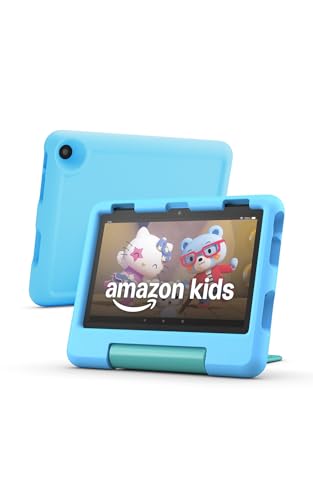
The Fire HD 8 Kids is the smaller of Amazon’s two tablets for ages 3 to 7. It is a 2024 release in the 12th generation, with an 8-inch screen, a kid-proof case and parental controls. It is the one we would look at first for small hands and travel.
We did not handle the tablet ourselves. This profile compares what Amazon says in its October 2024 announcement and support pages with the specs on Notebookcheck’s product page, and it points out where sources are silent or disagree.
The Short Version
The Fire HD 8 Kids is the portable choice. At 8 inches it fits in a bag and in smaller hands, and it is easier to prop up on a car seat tray. Amazon’s age range for it is 3 to 7, and we do not recommend it for children under 3.
If you want a bigger picture for sharing, the Fire HD 10 Kids is the other option, and the standard Fire HD 10 is for adults.
Who It Is Made For
Amazon sells the Fire HD 8 Kids for ages 3 to 7 and the Fire HD 8 Kids Pro for ages 6 to 12. Those ranges come from Amazon. A kids tablet is still a screen, so rules and supervision matter more than any hardware feature. For guidance on family media rules, the American Academy of Pediatrics publishes advice at healthychildren.org. If your child is under 3, this is not the product designed for them.
Key Specs According to Amazon and Notebookcheck
- Display: 8-inch IPS, 1280 x 800, roughly 189 ppi, per Notebookcheck.
- RAM: Notebookcheck lists 3GB or 4GB, and Amazon says only that the 2024 lineup has more RAM than before. Confirm the amount on the listing.
- Storage: 32GB or 64GB listed by Notebookcheck, with a microSD card reader. Amazon says the lineup supports up to 1TB cards, sold separately.
- Battery: Up to 13 hours per the manufacturer, according to Notebookcheck.
- Weight and size: 18.3 oz (518g) and 1.06 x 8.74 x 7.09 inches (27 x 222 x 180 mm), per Notebookcheck.
- Cameras: 5MP and 2MP, per Notebookcheck.
- Wireless and ports: Wi-Fi 5, Bluetooth 5.2, USB-C and a 3.5mm headphone jack, per Notebookcheck.
- Audio: Stereo speakers, per Notebookcheck.
- Case: Kid-proof, offered in several designs per Amazon.
Notebookcheck does not state the processor or the operating system on its page. The tablet uses Fire OS like other Fire tablets. Amazon’s developer documentation says Fire OS apps are listed in the Amazon Appstore rather than Google Play, so check that your child’s favorite apps exist in the Amazon Appstore.
The Case and the Warranty
Amazon’s announcement describes a sturdy kid-proof case, with designs including Disney Pixar Cars, Disney Princess and Marvel Avengers. The case is where the “kids” part of this tablet lives. It protects the corners and gives small hands something to hold.
Notebookcheck’s page mentions a two-year warranty. We did not find the terms on an Amazon page we opened, so read them on the current listing before you buy.
Parental Controls and Amazon Kids+
Amazon’s page on the Parent Dashboard describes daily time limits, educational goals with a Learn First setting and adjustable age filters. These are tools you configure. They help you set boundaries, and they are not guarantees about what a child will see or how long they will use it.
Amazon’s announcement says Amazon Kids+ is included, but the page does not give the included period. Notebookcheck notes that Kids+ requires a subscription for full use. Check the listing for the length of the included period and set a reminder for when it ends.
Ads, Downloads and Car Rides
We did not open a page that covers ads on this tablet, whether in Kids+ or in apps you add yourself, so check each app’s listing before you install it.
For car rides, plan the night before. Download a few shows, an audiobook and a game, switch the tablet to airplane mode, and make sure everything plays. A 13-hour battery rating from the manufacturer is comfortable for a day trip.
Headphones and Volume
We did not find a page that describes a built-in headphone volume cap on the Fire HD 8 Kids, so do not assume one exists. Loud listening for long stretches is hard on young ears, so keep the volume low, watch how long your child listens and check the audio settings after setup.
Size and Handling for Small Hands
Notebookcheck lists 18.3 oz (518g) for the tablet, and the page does not say whether that includes the case. Either way, the Fire HD 8 Kids is lighter than the 10-inch model, and the shorter width is easier for a small child to grip with two hands. In a car, a smaller tablet is also easier to tuck into a seat-back pocket. If your child is at the older end of the range and mostly watches at a table, the size difference matters less.
Fire HD 8 Kids Compared With Family Tablets
A kids tablet is a closed, simple device. An iPad or a Samsung tablet can do far more, but it needs a separate case and more setup of controls. If the tablet is for one child and you want a single package with a case, a content service and controls built in, a Kids model is the simpler path. If you also want to use the tablet yourself for work or drawing, a shared family tablet may suit you better.
Pros and Cons at a Glance
Pros
- Small and light for young children and bags.
- Kid-proof case in several designs.
- microSD slot and a headphone jack.
- Parental controls through the Parent Dashboard.
- Up to 13 hours of battery life per the manufacturer.
Cons
- Smaller screen than the 10-inch Kids model.
- 1280 x 800 resolution is lower than the 10-inch model’s 1080p.
- Fire OS and the Amazon Appstore instead of Google Play.
- Not for children under 3.
Who Should Buy It
- Families with a child aged 3 to 7 who want the lightest option.
- Parents planning car rides and trips.
- Anyone who wants a case, controls and content in one package.
Who Should Look Elsewhere
- Siblings sharing a screen: the Fire HD 10 Kids.
- Families who want an adult tablet and more apps: an iPad or a Samsung tablet.
- Children under 3.
Before You Buy
- Confirm the listing says Fire HD 8 Kids, not Kids Pro.
- Check the included Kids+ period and the warranty terms.
- Download offline content before trips.
- Set up the Parent Dashboard before handing it over.
See the current price and availability here: Fire HD 8 Kids on Amazon. Buying through our link may earn a commission at no cost to you.
To see where this model lands among ten tablets, read our ranking of the best tablets of 2026.
Sources