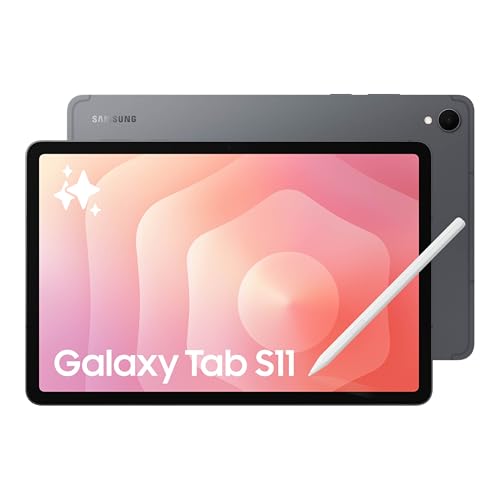
The Samsung Galaxy Tab S11 is the 11-inch model in Samsung’s flagship tablet series, launched in September 2025 alongside the larger Tab S11 Ultra. We rank it first among the Android tablets in our lineup. This profile explains what Samsung says about it, where the trade-offs are and who gets the most from it.
This profile rests on the specs Samsung publishes, not on our own time with the tablet. Where Samsung’s page speaks about the series rather than the 11-inch model, we say so.
The Short Version
Pick the Galaxy Tab S11 if you want an Android tablet that behaves like a small laptop and a sketchbook at the same time. The screen, the included S Pen and the water resistance rating are the headline items. Samsung DeX, the desktop-style mode, adds windows and a taskbar when you connect a keyboard.
Skip it if your plan is mostly streaming video and reading. A mid-range or budget tablet does those jobs well for much less. Within our lineup, the Galaxy Tab S10 FE is the sensible step down from Samsung, and the OnePlus Pad 3 is the alternative if you prefer a bigger screen for media.
What Samsung Says About the Tab S11 Series
Samsung publishes one page for the Tab S11 series. It covers the 11-inch Tab S11 and the 14.6-inch Tab S11 Ultra together, and the detailed figures we could read on it were labeled for the Ultra. We therefore keep to the claims that apply to the series and flag the rest.
- Display type: Dynamic AMOLED 2X. On the Ultra, Samsung lists a 120 Hz adaptive refresh rate and HDR peak brightness of up to 1600 nits, with 1000 nits in High Brightness Mode. Samsung’s page does not give those numbers for the 11-inch model in the text we could read.
- Chip: A 3nm MediaTek chipset. Samsung’s page does not name the exact model.
- Water and dust resistance: IP68 for the tablet, and the S Pen is IP68-rated too.
- S Pen: Included with the tablet.
- Storage expansion: microSD up to 2 TB, sold separately.
- Charging: Samsung mentions Super Fast Charging.
- Software: Samsung says the Ultra is eligible for up to 7 generations of Android OS upgrades and 7 years of security updates from the global launch date.
- Connectivity: Wi-Fi 7.
- Galaxy AI: Gemini Live, Drawing Assist, Note Assist and Writing Assist are named. Samsung says basic Galaxy AI features are free while some enhanced and third-party AI features may carry fees, and some features need a Samsung account and an internet connection.
- Colors: Gray and Silver.
The listing we link below is the 128GB Wi-Fi model in Gray, the lowest entry point into the series.
Display: Why AMOLED Matters
AMOLED panels light each pixel individually. In practice that means true blacks, strong contrast and colors that look rich in a dim room. If you watch movies in bed, read comics or edit photos, the difference from an LCD tablet is easy to see side by side. It is also why Samsung’s tablets tend to appeal to people who spend their screen time on video and art.
Two cautions. First, we are not quoting a brightness or refresh figure for the 11-inch screen, because the page we read gave those for the Ultra. Second, AMOLED is a feature, not a guarantee of outdoor readability. If you plan to use the tablet in direct sun, look at Samsung’s brightness spec for the exact model.
The S Pen and Galaxy AI
The S Pen in the box sets this tablet apart from much of the competition. Apple’s Pencil Pro and Samsung’s S Pen are both stylus options, but only the S Pen comes with the tablet. That matters for budgets: with an iPad, the Pencil is a separate accessory.
Samsung’s AI tools are aimed at the pen as well. Note Assist and Drawing Assist are named on the series page, and Writing Assist covers rewriting text. These are optional conveniences, and Samsung is clear that some features may involve fees or require an account. If you do not want any of that, the tablet still works as a normal Android tablet.
For students who take handwritten notes, the pen plus split-screen apps is the practical combination: lecture slides on one side, notes on the other. For artists, the S Pen is enough for sketching, though professional illustrators should compare the app ecosystems of Android and iPad before choosing.
Samsung DeX and Productivity
DeX turns the Android interface into a windowed desktop with a taskbar. Connected to a keyboard and, where supported, an external display, it can replace a lightweight laptop for email, documents, video calls and web apps. Samsung highlights DeX in its Tab S11 series launch material, and the feature has been a staple of the Galaxy Tab S line.
The limits are the ones every Android tablet shares. Some apps are phone layouts stretched onto a bigger canvas, and a few desktop programs simply have no Android version. If your job depends on specific Windows or Mac software, check that before you buy a tablet of any brand.
Durability and Software Support
IP68 is the most useful durability item on the list, and it is unusual among tablets. It tells you the tablet is built to resist dust and water under the conditions of the rating. It does not mean you should drop it in a pool, and Samsung’s warranty terms decide what is covered. Treat it as protection against spills and splashes, not a license to be careless.
Update promises matter more over a long ownership period. Samsung’s page says seven generations of Android upgrades and seven years of security updates for the Ultra. If you plan to keep a tablet for five years or more, that is a strong reason to favor Samsung’s premium line. Confirm the policy for the 11-inch model on the page when you buy.
Pros and Cons at a Glance
Pros
- AMOLED screen, the best display type in our Android picks.
- S Pen included and IP68 for both tablet and pen.
- Long update window announced by Samsung.
- microSD expansion up to 2 TB.
- DeX for desktop-style work.
Cons
- Premium tier, so it costs much more than a Galaxy Tab S10 FE or a Fire tablet.
- Some Galaxy AI features may involve fees or an account.
- Android tablet apps vary in quality.
- The keyboard cover and extra accessories are separate purchases.
Who Should Buy the Galaxy Tab S11
- Students and note-takers who want a pen in the box and long software support.
- Android users who want the best screen and performance without moving to Apple.
- Movie and comic fans who value contrast and color.
- Light productivity users who like the idea of DeX with a keyboard.
Who Should Look Elsewhere
- Budget shoppers: the Galaxy Tab S10 FE gives you the S Pen at a lower tier, or a Fire tablet covers basic streaming.
- Big-screen movie watchers: the OnePlus Pad 3 has a 13.2-inch display.
- iPad loyalists: if your phone, laptop and apps are in Apple’s world, an iPad fits better.
Before You Buy
- Confirm the model on the listing says Galaxy Tab S11, not Ultra or S10 FE.
- Check whether the S Pen is in the box for your listing.
- Decide how much storage you need. The 128GB model fills quickly with downloaded video, though microSD helps.
- Budget for a case and a keyboard if you plan to type.
See price on Amazon
To see where this model lands among ten tablets, read our ranking of the best tablets of 2026.
Sources