We earn a commission if you buy through our links, at no extra cost to you.
Best Tablet for Kids Ages 3-7: Fire Kids vs. iPad
Choosing a tablet for a child aged 3 to 7? Compare Amazon's Fire Kids tablets with a shared family iPad, covering cases, controls, ads, offline use and volume.
At a glance
For ages 3 to 7, the Amazon Fire HD 8 Kids is the easier pick for small hands and car rides, and the Amazon Fire HD 10 Kids adds a bigger screen. Both are sold for ages 3 to 7. For one shared family tablet, consider the Apple iPad 11-inch (A16) with Screen Time and a separate case.
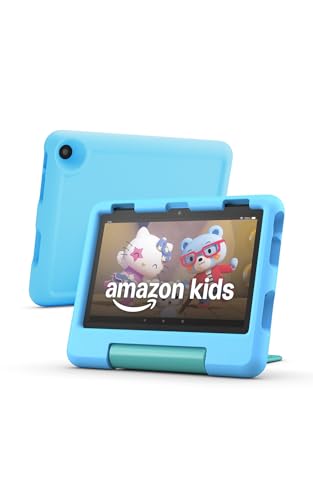

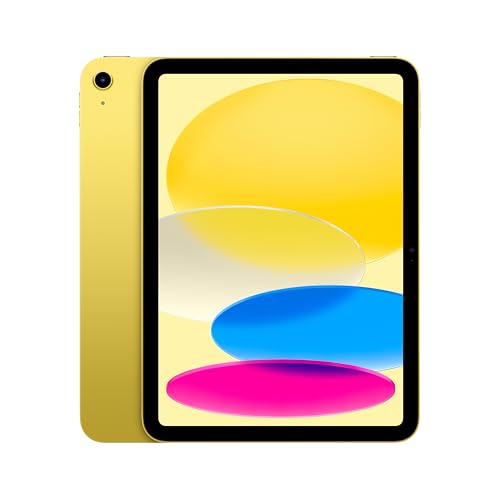
If you are shopping for a tablet for a child between 3 and 7, you have two sensible paths. The first is a dedicated kids tablet from Amazon, which bundles a protective case, parental controls and a children’s content service. The second is a family iPad with Apple’s Screen Time settings and a case you buy yourself. Both can work. They suit different households.
One point first. The kids tablets we cover are made by Amazon for ages 3 to 7, and Amazon does not sell them for younger children. If you searched for a tablet for toddlers aged 2 to 5, our answer for the youngest group is to wait. For 3, 4 and 5-year-olds, the options below apply, with you in the room.
We did not handle any of these tablets ourselves. We compared the specs and policies published by Amazon and Apple, and every claim about controls is described as a tool for you to use, not a promise about what a child will or will not see.
What to Check Before You Choose
Here is what Amazon and Apple actually say about the questions parents ask most.
- Case. Amazon describes its Fire Kids tablets as having a big bumper to protect from drops, and says the Fire HD 8 Kids comes with a sturdy kid-proof case. The Fire HD 10 Kids also comes with a kid-friendly case. An iPad has no such case in the box.
- Included Kids+ period. Android Central reports that the Fire HD 10 Kids includes 12 months of Amazon Kids+. For the Fire HD 8 Kids, Amazon’s announcement says Kids+ is included but does not state the period, so read the listing and set a reminder.
- Parental controls. Amazon’s Parent Dashboard lets you set daily time limits, educational goals and age filters for each child’s profile, and Amazon’s buying guide says the Parent Dashboard supports profiles for up to four children.
- Warranty. The Amazon pages we opened do not give warranty terms for these tablets, so read them on the listing.
- Ads. We did not open a page that covers ads on these tablets, so check each app before you install it.
- Offline use. Streaming needs a connection, so download shows, books and games ahead of time and check that they play in airplane mode.
- Volume. We did not find a volume cap on a page we opened, so set and check the volume yourself.
Fire HD 8 Kids: The Easy Pick for Small Hands and Car Rides
The smaller, lighter Fire Kids tablet for ages 3 to 7, with a kid-proof case, parental controls and an 8-inch screen that fits a seat tray and a small bag.
The Fire HD 8 Kids has an 8-inch 1280 x 800 display and weighs 18.3 oz (518g) according to Notebookcheck’s listing, with a microSD slot and a headphone jack. Amazon says its case comes in several designs, including Disney Pixar Cars, Disney Princess and Marvel Avengers. Amazon rates the battery at up to 13 hours.
For a car ride, the size matters. A child can hold it with two hands, and it will not take over the seat. Read the details in our Fire HD 8 Kids profile.
Fire HD 10 Kids: A Bigger Screen to Share
The larger Fire Kids tablet for ages 3 to 7, with a 10.1-inch 1080p screen, a kid-friendly case and, according to Android Central, 12 months of Amazon Kids+.
If siblings watch together, or a child likes to prop the tablet on a table, the 10-inch screen is the better fit. Amazon lists 3GB of RAM and up to 13 hours of battery life for the 2023 model, and says it is 25% faster than the one before. The extra size means more weight in a bag and on a lap.
Our Fire HD 10 Kids profile covers it in more detail. Do not confuse it with the standard Fire HD 10, which is an adult tablet without a kids case.
iPad 11-inch (A16): One Shared Family Tablet
A family tablet for parents who want one device for kids and adults, used with Apple's Screen Time and a protective case bought separately.
An iPad is not a kids tablet. It is a general tablet that you configure for a child. Apple’s tech specs list an 11-inch Liquid Retina display, the A16 chip, 128GB, 256GB or 512GB of storage and a weight of 1.05 pounds (477g) for Wi-Fi models. Apple says battery life is up to 10 hours of web browsing or video on Wi-Fi.
That is heavier than a Fire Kids tablet, and nothing protective comes in the box. A shockproof case is a must for a young child, and you buy it separately. See our iPad 11-inch (A16) profile for the full spec rundown.
How Screen Time Works on an iPad
Apple’s support page on Screen Time describes these tools for a child in Family Sharing:
- Screen Time Schedules let you choose which apps your child can access at different times of day, with separate weekday and weekend routines.
- Time Allowances set limits on how long a child can use apps or app categories each day.
- Content & Privacy Restrictions let you manage Apple content, apps and settings for your child, including age ratings for apps, music, movies and TV shows.
Apple says your child should have their own Apple Account and that you must be the Family Sharing organizer or a parent or guardian to set these controls. To find them on the device, open Settings, tap Family, then tap your child’s name. Like Amazon’s tools, these are settings you choose and maintain.
Fire Kids or a Family iPad?
Choose a Fire Kids tablet if your priorities are a built-in case, a single content service and simple setup for one child. Choose an iPad if you want a device the whole family uses, a broader app selection and a longer useful life as your child grows, and you are willing to buy the case and set up Family Sharing yourself.
Cost is a part of that choice, and the Fire Kids tablets sit well below the iPad’s tier, so an iPad plus a case is a bigger commitment. Neither choice replaces rules and conversation.
Set Up Before You Hand It Over
- Create the child profile in the Parent Dashboard, or set up Family Sharing and Screen Time on the iPad.
- Choose daily limits. Amazon’s dashboard also offers a Learn First setting that can hold back entertainment until educational goals are met.
- Pick the apps yourself. Check each app before you install it, including how it handles ads.
- Download offline content the night before a trip and check that it plays in airplane mode.
- Set the volume low and check it again. Long stretches of loud listening are hard on young ears.
A Note on Family Screen Rules
The American Academy of Pediatrics’ healthychildren.org advises creating a family media plan that fits your routines and values. It suggests turning off autoplay and notifications, using parental controls for time limits, downloads, contacts and purchases, and choosing content that teaches, inspires creativity or encourages connection while avoiding heavy advertising. It also recommends screen-free times and zones, such as at the dinner table and before bed. Use that page to shape your own rules, and revisit them as your child grows.
Our Pick
For most families with a child between 3 and 7, start with the Fire HD 8 Kids. It is the easiest to carry, the case is included, and it works well for car rides once you download shows ahead of time. Step up to the Fire HD 10 Kids for a bigger screen. Choose the iPad only if you want a shared family device and are happy to add a case and manage Screen Time.
Whichever you choose, sit with your child at first, check the settings, and keep the volume low.
Sources
- New Amazon Kids devices, 2023 announcement (Amazon)
- Amazon’s new Fire HD 10 Kids tablets (Android Central)
- Fire HD 8 tablets announcement, October 2024 (Amazon)
- Amazon Kids devices buying guide (Amazon)
- Set parental controls using Amazon Parent Dashboard (Amazon)
- Amazon Fire HD 8 Kids (2024) specifications (Notebookcheck)
- iPad 11-inch (A16) tech specs (Apple)
- Use Screen Time for your child (Apple Support)
- How to make a family media use plan (HealthyChildren.org, AAP)
Frequently asked questions
What is the best tablet for a 5-year-old?
For most families, a Fire HD 8 Kids or Fire HD 10 Kids is the simplest start, because the case, parental controls and a content service come in one package, and Amazon makes them for ages 3 to 7. If you want a tablet the whole family shares, an iPad with Screen Time settings and a separate protective case is the alternative.
Is there a tablet for toddlers aged 2 to 5?
Amazon sells its Fire Kids tablets for ages 3 to 7, so we do not recommend a tablet for a 2-year-old. For a 3, 4 or 5-year-old, the Fire HD 8 Kids is the smaller and lighter of the two.
What is the best kids tablet for car rides?
A smaller, lighter tablet is easier on a seat tray, so the Fire HD 8 Kids is our first pick for the back seat. Whichever tablet you choose, download shows and games before you leave, because streaming does not work without a connection.
Do Fire Kids tablets have ads?
We did not open an Amazon page that covers ads on these tablets, in Kids+ or in apps you add yourself, so check the listing and each app before you install it.
Do kids tablets protect hearing?
We did not find a volume cap on a page we opened, so check the volume setting yourself and keep it low. Long stretches of loud listening are hard on young ears.
Can I use an iPad for a young child?
Yes, with setup. Apple's Screen Time lets a parent set schedules, time allowances and content restrictions for a child on Family Sharing, with the child using their own Apple Account. An iPad does not come with a kid-proof case, so plan to buy one separately.