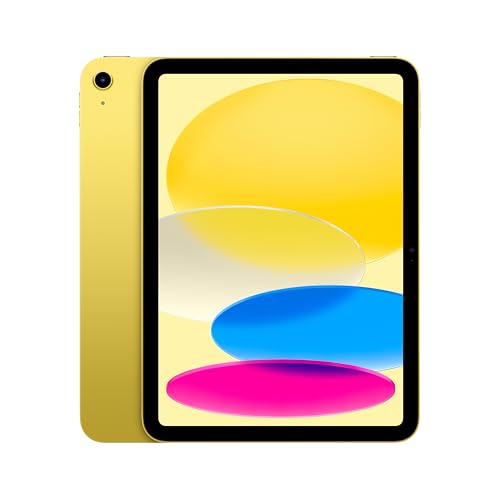
The 11-inch iPad with the A16 chip is the iPad for people who want the Apple experience without extras they may not use. It handles the basics well: reading, streaming, video calls, schoolwork, light creative apps and games. This profile goes through what Apple publishes about the specs, what the entry model leaves out, and when it makes sense to spend more on the iPad Air 11-inch (M4).
This profile rests on the specs and descriptions Apple publishes, not on our own time with the tablet. We flag the places where Apple’s page is silent.
The Core Specs, According to Apple
Apple lists the A16 chip with a 5-core CPU, a 4-core GPU and a 16-core Neural Engine. Apple’s tech specs page does not list the amount of memory, so we cannot give the RAM. Storage options are 128GB, 256GB and 512GB, and Apple notes that actual formatted capacity is less.
The body measures 9.79 inches tall, 7.07 inches wide and 0.28 inch (7mm) deep. The Wi-Fi model weighs 1.05 pounds (477 grams) and the Wi-Fi + Cellular model 1.06 pounds (481 grams). That is slightly thicker and heavier than the iPad Air, but you would notice the difference only holding both side by side.
Wireless is Wi-Fi 6 (802.11ax) with 2x2 MIMO and Bluetooth 5.3, plus 5G and Gigabit LTE on cellular models. The USB-C port supports charging, DisplayPort and USB 2.0 speeds, up to 480Mb/s, and one external display up to 4K at 60Hz. USB 2.0 speed is fine for charging and keyboards, but moving big files to an external drive will be slower than on the Air, which Apple lists at USB 3 speeds.
Display
Apple lists an 11-inch Liquid Retina display at 2360 by 1640 pixels and 264 ppi, with 500 nits of brightness, True Tone and a fingerprint-resistant coating. Text is crisp and the screen is bright enough for most rooms.
What Apple’s page does not mention is lamination, an antireflective coating or wide color (P3). The iPad Air’s page lists all three. We are not saying the A16 iPad lacks them, only that Apple does not list them for this model. If those features matter to you, the Air is the safer bet. For reading, streaming and schoolwork, the difference may not matter. For art, color work and bright rooms, it can.
Apple Pencil Support
This is the most important limit for creative buyers. Apple says the iPad (A16) supports the Apple Pencil (USB-C), and it also supports the 1st-generation Apple Pencil through a USB-C to Apple Pencil Adapter. Apple’s Pencil page lists the A16 iPad as a USB-C Pencil model and says it does not support the Pro.
Apple’s own feature table shows the gap. The USB-C Pencil offers pixel-perfect precision, low latency, tilt sensitivity, magnetic attach and hover. It does not have pressure sensitivity, double-tap, barrel roll, squeeze, haptic feedback or Find My, all of which the Pencil Pro adds. Apple’s iPad Air spec page mentions Pencil hover as a display feature, but the A16 spec page does not.
For note-taking, highlighting PDFs and signing documents, the USB-C Pencil is plenty. For artists who rely on pressure-sensitive lines, the Pro is the better Pencil, and that means choosing the iPad Air or the iPad Pro 11-inch (M5).
Cameras, Security and Battery
The rear camera is a 12MP Wide at f/1.8. The front camera is a 12MP landscape Center Stage camera at f/2.4, which keeps you centered in video calls. Security comes from Touch ID in the top button.
Apple rates the 28.93-watt-hour battery for up to 10 hours of web surfing on Wi-Fi or video watching. Cellular models are rated for up to 9 hours of web use over cellular data.
Who Should Buy the iPad 11-inch (A16)
- Families and first-time iPad buyers who want a reliable tablet for video, books and games.
- Students on a budget who need notes, PDFs and video calls. Apple’s spec page does not list a keyboard accessory, so check Apple’s accessory pages if you want to type a lot.
- Casual note-takers and sketchers who are happy with the USB-C Pencil.
- Anyone replacing an older iPad who wants USB-C and a current screen without stepping up to a pricier model.
Who Should Skip It
- Serious artists. If you want pressure sensitivity, barrel roll or squeeze, you need Pencil Pro support, which means the Air or Pro.
- Heavy multitaskers and video editors. The Air’s M4 chip and 12GB of memory, per Apple, give more room.
- People who want a handheld. The iPad mini (A20 Pro) is far lighter.
- Anyone who wants Apple Intelligence. Apple’s specs page for this iPad does not list it.
Buying Tips
Start with the storage question. 128GB is enough for streaming, reading and light apps, but offline video, games and photos can fill it quickly, and you cannot add a card later. If you want the tablet to last four or five years, 256GB is the safer option.
Think about accessories before you buy. The Pencil is not included, and a case and keyboard cost extra. The 1st-generation Pencil needs an adapter, so check that any Pencil you buy matches this iPad. The USB-C Pencil is the simplest choice.
If you plan to draw on it, consider a matte screen protector. Apple does not mention a nano-texture option for this model, so any paper-like finish is an add-on from a third party.
How It Compares With the iPad Air
The two 11-inch iPads look alike from across a room, and the differences show up in the spec sheets. Per Apple, the iPad Air (M4) has an 8-core CPU, a 9-core GPU and 12GB of memory, while the A16 iPad has a 5-core CPU and a 4-core GPU, and Apple does not list its memory. The Air lists Wi-Fi 7 and USB 3 speeds, while this iPad lists Wi-Fi 6 and USB 2.0 speeds. The Air also lists a laminated, antireflective display with wide color and Pencil Pro support.
None of that makes the A16 iPad a bad choice. The extra spending on the Air buys headroom, a better screen for art and a better Pencil, and it pays off only if you will use them. A family tablet that mostly plays video and runs kids’ games gets little from those upgrades.
The Bottom Line
The iPad 11-inch (A16) does the everyday work of a tablet without fuss. It has a bright, sharp display, USB-C, Touch ID and Pencil support, at the lower end of Apple’s lineup. It is not the iPad for heavy art, professional editing or the longest lifespan, and Apple’s spec page leaves a few features unlisted. Choose it for simple use and a sensible budget, and step up to the Air when drawing and power matter.
See price on Amazon
To see where this model lands among ten tablets, read our ranking of the best tablets of 2026.
Sources