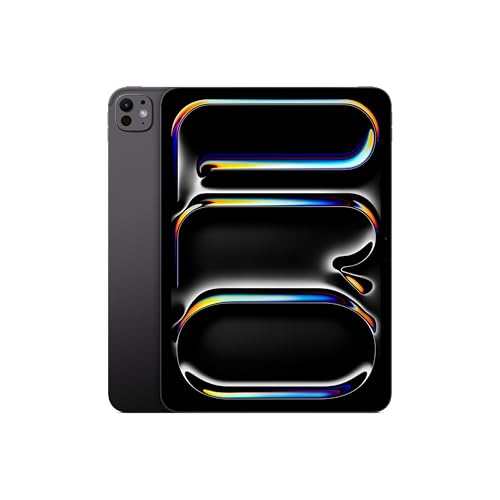
The iPad Pro 11-inch with the M5 chip sits at the top of Apple’s tablet lineup. It is thin and light, and its screen is one no other iPad in this group can match, which is reflected in its premium tier. This profile summarizes what Apple publishes about the hardware, explains who gets real benefit from Pro-level features, and says when the iPad Air 11-inch (M4) is the smarter purchase.
This profile rests on Apple’s own specifications and descriptions, not on our own time with the tablet.
The Hardware, According to Apple
Apple lists the M5 chip with a 16-core Neural Engine and 153GB/s of memory bandwidth. The 256GB and 512GB models have a 9-core CPU (3 super and 6 efficiency cores) and a 10-core GPU. The 1TB and 2TB models have a 10-core CPU (4 super and 6 efficiency cores) and the same 10-core GPU. Memory also scales with storage: 12GB of unified memory on the two smaller models and 16GB on the two larger ones. Storage options are 256GB, 512GB, 1TB and 2TB, and formatted capacity is less than those figures.
The body is thin. Apple gives 5.3mm (0.21 inch) of depth, and the Wi-Fi model weighs 0.98 pound (444 grams), and the Wi-Fi + Cellular model 446 grams. That is lighter than the 11-inch iPad Air, which is surprising for a Pro model.
The connectivity list is long. Apple lists Wi-Fi 7 with 2x2 MIMO, Bluetooth 6, Thread and Apple’s N1 wireless chip, and cellular models add the C1X modem with 5G. The single USB-C port is Thunderbolt/USB 4, supporting speeds up to 40Gb/s and one external display up to 6K at 60Hz or 5K at 120Hz. Apple says fast charging reaches 50 percent in about 30 minutes with a 60W or higher USB-C adapter. The battery is 31.29 watt-hours, rated for up to 10 hours of web browsing or video on Wi-Fi.
The Display Is the Main Reason to Pay More
Apple calls it an Ultra Retina XDR display, using tandem OLED technology. The 11-inch screen is 2420 by 1668 pixels at 264 ppi and supports ProMotion at 10 to 120Hz, P3 wide color and True Tone. It is fully laminated, antireflective and fingerprint resistant. Apple lists up to 1000 nits of SDR brightness, 1000 nits for full-screen HDR and a 1600-nit peak for HDR content, with a 2,000,000:1 contrast ratio.
Here is why that matters. OLED shows true black, which makes photos, video and illustrations look rich. A 120Hz refresh rate makes scrolling and Pencil strokes feel smoother. And Apple offers nano-texture glass, an etched finish that cuts glare, on the 1TB and 2TB models only. If you work near windows or under bright lights, that may be worth it, though it means stepping up to a larger storage tier.
Apple Pencil and Keyboard
Apple’s spec page lists support for Apple Pencil Pro and Apple Pencil (USB-C), and for hover. Apple’s Pencil page says both Pencils work with the iPad Pro 11-inch and 13-inch (M4 and M5). The difference between them is in the features. The Pro adds pressure sensitivity, double-tap and squeeze to switch tools, barrel roll, haptic feedback and Find My, while the USB-C Pencil offers precision, low latency, tilt sensitivity, magnetic attach and hover.
Apple’s page does not state a latency number in milliseconds for either Pencil, so we do not repeat one. The Pencil and the Magic Keyboard are sold separately. The spec page does not describe the keyboard, so check Apple’s accessory pages for details.
Cameras and Security
The back camera is a 12MP Wide at f/1.8 with up to 5x digital zoom and 4K video at up to 60 frames per second. The front camera is a 12MP landscape Center Stage camera at f/2.0. The Pro uses Face ID through the TrueDepth camera, rather than the Touch ID button on the Air.
Apple says Apple Intelligence is built into iPadOS, available with Siri and a supported language, and that some server-side features have daily usage limits.
Who Should Buy the iPad Pro 11-inch (M5)
- Working and aspiring artists who draw for long sessions and want the OLED screen, 120Hz ProMotion and the option of nano-texture glass. Our best tablet for drawing beginners guide explains where the Pro fits.
- Video editors, photographers and designers who work with large files and can use the Thunderbolt port and the memory in the higher storage tiers.
- People who want the best screen for HDR video and photos.
- Buyers who keep devices for years and want headroom.
Who Should Skip It
- Most casual users. For reading, browsing, streaming and email, the iPad Air or the iPad 11-inch (A16) does the job for less.
- Beginners who are not sure they will draw. The Air supports the same Pencils.
- Budget shoppers. The Pro is Apple’s premium tablet, and accessories add up.
- People who want a handheld. The iPad mini (A20 Pro) is much smaller.
Buying Tips
Be careful with storage and memory. The 256GB and 512GB models have 12GB of memory and a 9-core CPU, while the 1TB and 2TB models have 16GB and a 10-core CPU. Nano-texture glass is also limited to the larger models. If you want those features, plan your budget for the higher tier. If you do not, 256GB is a sensible starting point, because there is no microSD slot.
Budget for the Pencil and a keyboard. The Pro includes neither, and accessories add to the total cost. If you draw, the Pencil Pro is the one Apple lists with pressure sensitivity.
Finally, consider whether you need Pro at all. The iPad Air shares Pencil Pro support and laminated antireflective glass, and it uses Apple’s M4 chip with 12GB of memory. The Pro’s advantages are the OLED panel, ProMotion, Thunderbolt, faster charging and thinner body.
What the Pro Adds for Artists
For drawing in particular, three things set the Pro apart on paper. The OLED panel gives deeper blacks and a wider contrast range, so dark illustrations keep detail. ProMotion lets the display refresh at up to 120Hz, and Apple says the rate can drop as low as 10Hz. And the nano-texture option adds a matte, etched surface, though only on the larger storage tiers. None of these change the Pencil support, which the Air shares, so the decision comes down to how much you value the screen.
The Bottom Line
The iPad Pro 11-inch (M5) is the iPad for people who care about the screen and want the headroom for demanding creative work. For everyone else it is more tablet than needed. If you are curious about drawing, start with the Air and move up only if the display becomes your limit.
See price on Amazon
To see where this model lands among ten tablets, read our ranking of the best tablets of 2026.
Sources