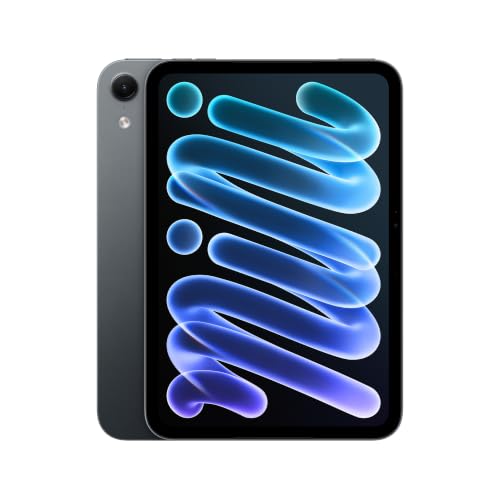
The iPad mini is the iPad you can hold in one hand. In its newest form, Apple has moved it to an OLED display, an A20 Pro chip and an IP67 rating, which makes it a very different tablet from the one it replaces. This profile covers what Apple publishes about the specs, who the mini suits, and when a larger iPad is the smarter choice. If you want the full-size alternatives, see our profiles of the iPad Air 11-inch (M4) and the iPad 11-inch (A16).
This profile rests on the specs and descriptions Apple publishes, not on our own time with the tablet. We say when Apple does not list a figure.
The Hardware, According to Apple
Apple lists the A20 Pro chip. The 128GB and 256GB models have a 5-core CPU (2 super cores and 3 efficiency cores), a 7-core GPU with Neural Accelerators and hardware ray tracing, and a 16-core Neural Engine. The 512GB model has a 6-core CPU (2 super and 4 efficiency cores), the same GPU, and dual 16-core Neural Engines. Apple’s page does not list the amount of memory.
Storage options are 128GB, 256GB and 512GB. Apple’s page lists no memory card slot, so choose storage for the apps, games and offline video you plan to keep.
TechCrunch’s report on the announcement says preorders opened on October 28 and sales began on November 6, with Apple claiming up to 60 percent faster multithreaded performance and up to 4.5 times faster AI performance than the previous generation. Those are Apple’s claims as reported by TechCrunch, and we have not verified them.
Size and Weight
The size is the whole point. Apple gives 7.69 inches tall, 5.22 inches wide and 0.21 inch (5.4mm) thick. The Wi-Fi model weighs 0.56 pound (255 grams) and the Wi-Fi + Cellular model 0.58 pound (263 grams). The 11-inch iPad Air weighs 1.02 pounds according to Apple, so the mini is roughly half the weight.
At that weight you can read in bed, on a train or standing in a subway car without your wrist tiring, and it slips into a small bag. Apple offers it in Midnight and Starlight finishes.
The OLED Display
Apple lists an 8.5-inch OLED display at 2316 by 1512 pixels and 326 pixels per inch. That is a high pixel density, and text and line art look crisp at close range. The display supports P3 wide color and True Tone. Apple rates SDR brightness at up to 600 nits, with HDR content reaching 1200 nits at peak and 600 nits full screen, a minimum brightness of 1 nit and a contrast ratio of 2,000,000:1. OLED panels can switch pixels fully off, which is why the contrast ratio is so high and why dark scenes in video look rich.
Apple also offers an optional nano-texture glass finish on the 256GB and 512GB models. It is a matte, etched-glass option meant to reduce glare. Apple’s page does not say how it feels with a Pencil.
Apple’s page lists no refresh rate and does not mention ProMotion for the mini. TechCrunch’s report does not give one either, so we cannot say whether it matches the 120Hz of the iPad Pro 11-inch (M5). If a smooth high refresh rate matters to you, confirm it before you buy.
Apple Pencil Support
Apple says the iPad mini (A20 Pro) supports Apple Pencil Pro and Apple Pencil (USB-C), including hover. Apple’s Pencil page explains the difference. Both have precision, low latency, tilt sensitivity, magnetic attach and hover. Only the Pro adds pressure sensitivity, double-tap and squeeze, barrel roll, haptic feedback and Find My.
For writing notes, marking up PDFs and quick sketches, the USB-C Pencil covers the basics. For drawing with pressure-sensitive brushes, the Pro is the one Apple lists with that feature. Both are sold separately. If you plan to draw seriously, see our drawing beginner picks before settling on a screen this small.
Water Resistance, Ports and Wireless
Apple rates the mini IP67 under IEC 60529, which it describes as protection to 1 meter for up to 30 minutes, and warns that the rating can decrease with normal wear. That is useful for a tablet you carry to a kitchen or beach, but it is not a reason to submerge it.
Wireless is Wi-Fi 7 (802.11be) with 2x2 MIMO, Bluetooth 6 and Thread. Wi-Fi + Cellular models add 5G and Gigabit LTE through Apple’s C2 modem, and are eSIM only, so there is no physical SIM tray. The single USB-C port supports charging, DisplayPort and USB 3 speeds up to 10Gb/s, and can drive one external display up to 4K at 60Hz.
Apple lists a 12MP Wide rear camera at f/1.8 with up to 5x digital zoom and 4K video at up to 60 frames per second, and a 12MP Center Stage front camera at f/2.0. Touch ID sits in the top button, and stereo speakers and dual microphones are listed.
Battery and Charging
The battery is 18.9 watt-hours. Apple rates it for up to 10 hours of web browsing or video on Wi-Fi and up to 9 hours of web browsing on cellular. Fast charging gets to 50 percent in about 30 minutes with a 35W or higher adapter, and Apple says a 20W adapter is in the box. That is a smaller battery than the larger iPads carry, but the screen is also much smaller.
Software and Apple Intelligence
Apple’s page says the mini supports Siri AI, which it describes as in beta on iPadOS 27, limited to certain languages and regions, with daily limits on some server-based features. We would treat that as a bonus and read Apple’s language list before counting on it.
Who Should Buy the iPad mini (A20 Pro)
- Readers and commuters who want a tablet that fits one hand.
- Travelers who want a second screen for maps, boarding passes and video, in a body that survives a splash.
- Note-takers and sketchers who like a small page and want Pencil Pro support.
- Shoppers who like OLED but do not need an 11-inch screen.
Who Should Skip It
- People who will type or multitask a lot. At 8.5 inches, split-screen and keyboard use get cramped. The iPad 11-inch (A16) gives more room for less.
- Serious artists who want a large canvas, toolbars and layers in view. An 11-inch iPad is the better fit.
- Budget shoppers. Apple prices the mini above the base iPad, per TechCrunch’s report of the announcement, so compare before you buy.
- People who want a laptop alternative. Look at the Air instead.
Using a Small Tablet Day to Day
A small tablet changes how you use it. Reading is the obvious strength, because a screen this size is closer to a paperback than a laptop. Video works well on a plane tray or a kitchen counter, and a tablet that fits a coat pocket or a small bag gets used more than one you leave at home. The limits are just as clear. Two apps side by side get small quickly, web pages show less at once, and an on-screen keyboard in portrait is cramped. Many people keep a mini as a second device next to a laptop or phone.
Sketching on a Small Canvas
The Pencil support matches larger iPads, so the mini handles sketching, annotation and handwriting. The trade-off is room. A small canvas means more zooming, less space for color panels and layers, and a hand that sits close to the screen edge. A common approach is to use a mini for thumbnails, journaling and reference sketches, then move to an 11-inch iPad for finished pieces.
Buying Tips
Pick storage with care, because there is no card slot. 128GB suits reading, streaming and notes, but offline video, games and large drawing files fill it quickly. Note that nano-texture glass and the 6-core CPU are tied to higher storage tiers on Apple’s page.
Decide on the Pencil. If you want pressure sensitivity and squeeze, buy the Pro. If you only annotate and write, the USB-C Pencil is simpler. Add a case, because a tablet this light is easy to drop even with an IP67 rating, and check the Amazon listing to confirm it says A20 Pro before you order.
The Bottom Line
The iPad mini (A20 Pro) is a compact tablet with an OLED display, Pencil Pro support and water resistance. It is not the tablet for big canvases, heavy multitasking or the lowest budget. If you want a small iPad for reading, travel and sketches, it is the one to look at, and if you want more room, move up to an 11-inch iPad.
See price on Amazon
To see where this model lands among ten tablets, read our ranking of the best tablets of 2026.
Sources