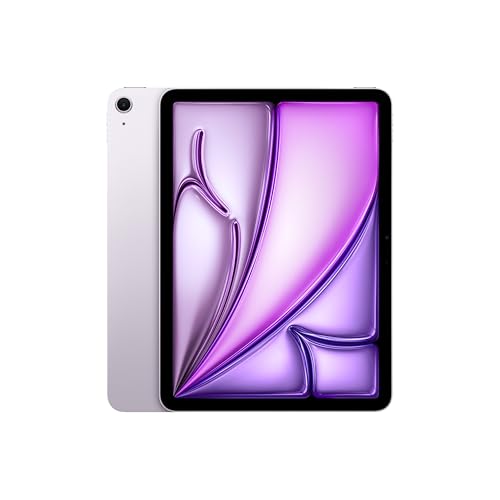
The iPad Air sits in the middle of Apple’s lineup, and with the M4 chip it is the tablet we think most shoppers should check first. This profile summarizes what Apple publishes about the 11-inch model, explains who it suits, and points out where another iPad makes more sense.
This profile rests on the specifications and descriptions Apple publishes, not on our own time with the tablet. When Apple does not give a number, we say so.
What Apple Says About the Hardware
According to Apple’s tech specs page, the 11-inch iPad Air (M4) runs Apple’s M4 chip with an 8-core CPU (3 performance and 5 efficiency cores), a 9-core GPU with hardware-accelerated ray tracing, and a 16-core Neural Engine. It has 12GB of unified memory with 120GB/s of memory bandwidth, a generous amount for a tablet in this tier. Storage options are 128GB, 256GB, 512GB and 1TB.
The body is slim. Apple lists 9.74 inches tall by 7.02 inches wide and 0.24 inch (6.1mm) thick. The Wi-Fi model weighs 1.02 pounds (464 grams), and the Wi-Fi + Cellular model 1.03 pounds (465 grams). That is light enough to hold one-handed for short stretches and easy to carry in a backpack all day.
Connectivity is up to date. Apple lists Wi-Fi 7 (802.11be) with 2x2 MIMO and Bluetooth 6, and Wi-Fi + Cellular models add 5G and Gigabit LTE. The USB-C port supports charging, DisplayPort and USB 3 speeds up to 10Gb/s, which matters if you plug in an external drive or a monitor. Apple’s page also lists a Magnetic connector and a Smart Connector on the back for accessories.
The Display
The screen is a 10.86-inch (diagonal) Liquid Retina display with IPS technology, at 2360 by 1640 pixels and 264 pixels per inch. Apple rates brightness at 500 nits and lists wide color (P3), True Tone, and a fingerprint-resistant oleophobic coating.
Two details deserve attention. First, Apple says the display is fully laminated, which removes the air gap between the cover glass and the panel. For anyone drawing or handwriting, lamination is why the pen tip looks as if it touches the line. Second, Apple lists an antireflective coating, which helps in a bright room or by a window. Apple’s page also says the display supports Apple Pencil hover, which previews where the Pencil will touch down.
What the Air does not have is the OLED panel or the variable refresh rate of the iPad Pro. Apple’s spec page for the Air does not list ProMotion, so if smooth 120Hz scrolling is a priority, look at the iPad Pro 11-inch (M5). For reading, video and note-taking, the Air’s screen is sharp and comfortable.
Apple Pencil and Keyboard Support
Apple says the iPad Air 11-inch (M4) supports Apple Pencil Pro and Apple Pencil (USB-C). Apple’s Pencil page spells out the difference. Both offer low latency, tilt sensitivity, magnetic attach and hover. Only the Pro adds pressure sensitivity, double-tap and squeeze to switch tools, barrel roll, haptic feedback and Find My. The USB-C Pencil charges through its cable, while the Pro pairs and charges wirelessly when it is attached to the side of the iPad.
For a student who mostly writes notes, the cheaper USB-C Pencil is a reasonable start. Artists who want to vary line weight by pressure and use squeeze or barrel roll should buy the Pro. Apple sells Magic Keyboard and other accessories separately. The specs page does not detail them, so check Apple’s accessory pages for fit and layout before ordering.
Cameras, Security and Battery
Apple lists a 12MP Wide camera on the back, with up to 5x digital zoom and 4K video at up to 60 frames per second, and a 12MP Center Stage front camera that records 1080p HD video.
Security is handled by Touch ID in the top button, not Face ID. Apple rates the 28.93-watt-hour battery for up to 10 hours of web browsing or video on Wi-Fi.
Apple’s spec page also notes that Apple Intelligence is built in, with language availability and some server-side usage limits listed in its footnotes. If those features matter to you, read Apple’s footnotes before buying so you know what is available in your language.
Who Should Buy the iPad Air 11-inch (M4)
- Students who want one tablet for notes, textbooks, writing and video calls.
- Beginner and hobby artists who want a laminated screen and Pencil Pro support at a lower tier than the Pro. See our best tablet for drawing beginners guide.
- Anyone keeping a tablet for four or five years. A chip this strong and 12GB of memory should age well, though Apple does not state how many years of updates to expect on the pages we read.
- People who want a laptop alternative for email, documents and light editing, with a keyboard accessory.
Who Should Skip It
- Shoppers on a tight budget. The iPad 11-inch (A16) handles reading, video and homework for less. It works with the USB-C Pencil only.
- People who want a smaller device. The iPad mini (A20 Pro) is far lighter and fits one hand.
- People who need the best screen. The Pro’s tandem OLED display is a different class.
- Android fans who want a stylus in the box. Samsung’s Galaxy Tab S11 includes its S Pen, according to Samsung.
Buying Tips
Choose storage carefully, because there is no microSD slot. A 128GB iPad is fine for streaming, reading and notes, but layered art, offline video and large app libraries eat space quickly. Decide on Wi-Fi versus Wi-Fi + Cellular before you buy: Apple’s cellular models add 5G, but you also need a data plan.
Check which Pencil your use needs. If you only write and annotate, the USB-C Pencil covers the basics. If you draw or want squeeze and haptic controls, the Pro is the match. Both are sold separately, and the Pro is the one Apple says supports pressure sensitivity.
A case with a flap or a keyboard folio protects the screen in a bag. If you draw, some people add a matte, paper-textured screen protector from a third-party brand. Apple’s spec page lists nano-texture glass only for the Pro, so any matte finish on the Air is an add-on. Expect a small change in how the screen looks and feels.
The Bottom Line
The iPad Air 11-inch (M4) is the sensible center of Apple’s lineup: more power and a better display than the base iPad, support for Apple’s top Pencil, and little reason to step up to the Pro unless you want OLED and ProMotion. Start with 256GB if your budget allows, buy the Pencil that matches how you will use it, and remember that Apple sells the model in a 13-inch size too, which this profile does not cover.
See price on Amazon
To see where this model lands among ten tablets, read our ranking of the best tablets of 2026.
Sources