We earn a commission if you buy through our links, at no extra cost to you.
Best Tablet for College Students: Notes, PDFs & Papers
Can a tablet replace your laptop at college? Pencil and S Pen notes, keyboards, storage, Office and Google Docs, student offers, plus three picks.
At a glance
For most college students, a tablet handles notes, PDFs and papers, and the iPad Air 11-inch (M4) is our main pick. The Samsung Galaxy Tab S10 FE suits Android fans, bundling a keyboard and S Pen. The iPad 11-inch (A16) is the budget-friendly iPad. Check your school's software rules first.
Searching “tablet for college student” usually means one question: can a tablet do the job of a laptop, or at least sit next to one in your backpack? For lectures, reading and light writing, often yes. For everything a course might demand, not always. This page explains what a tablet does well on campus, where it stops, and which three models from our list fit best.
This guide rests on the specifications and descriptions that Apple and Samsung publish, along with the app makers’ own pages, not on our own time with the tablets. We say so when a number is not published.
What a Tablet Does Well at College
A tablet earns its place in three ways.
- Handwritten notes. A pen turns the screen into a notebook you cannot leave at home. You can mark up lecture slides, annotate PDFs and sketch diagrams.
- Reading. Textbooks, articles and PDFs are comfortable on a screen around 11 inches, and the tablet weighs about a pound. Apple lists the iPad Air 11-inch (M4) Wi-Fi model at 1.02 pounds and the iPad (A16) Wi-Fi model at 1.05 pounds.
- Light writing and everything else. Email, video calls, web research and short papers all run fine, especially with a keyboard.
Where it gets harder is long writing sessions, spreadsheets with many windows, and anything that needs desktop software.
Handwritten Notes: Apple Pencil and S Pen
Apple Pencil. According to Apple’s Pencil page, Apple Pencil Pro and Apple Pencil (USB-C) both offer low latency, tilt sensitivity, magnetic attach and hover. Only the Pro adds pressure sensitivity, squeeze, double-tap, barrel roll and haptic feedback. For a student who mostly writes and highlights, the USB-C Pencil covers the basics. Apple says the iPad Air 11-inch (M4) supports both Pencils, while the iPad (A16) supports the USB-C Pencil and not the Pro. Pencils are sold separately.
S Pen. Samsung’s Galaxy Tab S10 FE page lists the S Pen as included. That matters for budgeting, since on an iPad the Pencil is a second purchase.
Neither company publishes a latency number in milliseconds on the pages we opened, so be skeptical of any figure without a source.
A Keyboard for Papers
If you write essays on it, buy a keyboard. Apple describes Magic Keyboard for the iPad Air as having a large glass trackpad and a floating cantilever design that adjusts to multiple viewing angles. It is sold separately, and we did not find its details on the spec pages. Apple’s iPad (A16) spec page does not list a keyboard accessory, so check Apple’s accessory pages for fit before you order one.
The Galaxy Tab S10 FE listing we link to is a bundle with the Book Cover Keyboard Slim, according to the listing title. Samsung’s own page shows the Book Cover Keyboard as an accessory sold separately, so confirm in the listing what is in the box. A slim cover keyboard is fine for notes and short papers, but a full laptop keyboard is better if you write daily for hours.
Storage: 128GB and Memory Cards
The iPad Air 11-inch (M4) comes in 128GB, 256GB, 512GB and 1TB, per Apple, and the iPad (A16) in 128GB, 256GB and 512GB. Neither takes a card. The Galaxy Tab S10 FE lists microSD support up to 2TB, sold separately, according to Samsung.
Class notes and PDFs take little room, and most students keep documents in the cloud. Offline movies, large apps and recorded lectures are what fill a base model. If you plan to store a lot offline, pick a larger size or the model with a card slot.
Microsoft 365, Google Docs and School Files
Your assignments will probably arrive as Word files, PowerPoint decks or Google Docs links, so check how the tablets handle them.
- Microsoft. Microsoft’s Word page says Word works on tablets running iOS and Android. It says Word on the web is available without a subscription, and that the mobile apps are free to download, while features such as formatting options, change tracking and Copilot need a Microsoft 365 subscription. Microsoft also says mobile app availability varies by country. Ask your school whether it provides a plan; Microsoft’s education page we opened does not say.
- Google. Google says you can view, present and edit documents with the Docs app, available in the App Store and Play Store. It says you can edit Word files directly in Docs and keep the original file, and that you can open, create and edit documents offline, with an option to make them available offline.
In practice, a tablet handles the file formats most courses use. Complex formatting in long papers, such as footnotes and citations, is where a desktop app can still be easier.
Campus Wi-Fi and Battery Claims
The Apple tablets here list Wi-Fi, with Wi-Fi 7 on the iPad Air (M4) and Wi-Fi 6 on the iPad (A16), per Apple. Campus networks vary, and some require a login page or device registration, so check your school’s IT page. Cellular versions of the Apple models exist but need a data plan.
On battery, these are the makers’ claims, not independent measurements. Apple rates the iPad Air (M4) and the iPad (A16) at up to 10 hours of web browsing or video on Wi-Fi. Samsung says up to 20 hours of video playback for the Galaxy Tab S10 FE. Real life will be lower with the screen bright, a pen in use and apps open, so plan to charge between classes if you carry it all day.
Student Offers From Apple and Samsung
Both companies run education programs, and the rules change, so confirm on their pages.
- Apple. Apple’s education store page says its offers are available to current and newly accepted college students and their parents, and to faculty, staff and homeschool teachers. It says eligibility is verified through UNiDAYS. The page we opened did not list which products the discount covers.
- Samsung. Samsung’s education page says current students, teachers and faculty qualify. It lists a valid .edu email, verification through providers such as StudentBeans or UNiDAYS, or ID.me. It says purchases may require additional eligibility verification and mentions a limit of two products per category in 12 months under the program.
Note that our Amazon links go to the Amazon listings, not to those education stores, so compare before you buy.
When a Laptop Is Still the Better Tool
A tablet is not the right choice for every major. Some courses and exam systems need software that runs only on Windows or macOS, such as proctored-exam lockdown programs, engineering or design suites, statistics packages and some programming tools. Tablets generally cannot run them.
Before you decide, check your school’s requirements. Look at the IT or bookstore page, your department’s list of required devices and the syllabus for each course. If you cannot find a clear answer, ask your department. If a tablet works for most of your week but not for exams, some students keep a school or library laptop for the few tasks that need it.
Our Picks for College
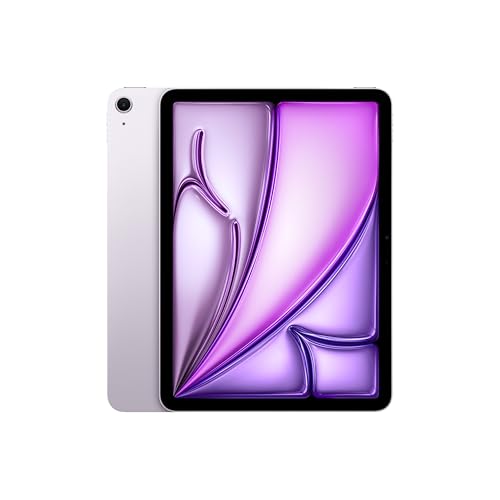
Main Pick: iPad Air 11-inch (M4)
M4 chip, 12GB of memory and a laminated, antireflective screen, with support for Apple Pencil Pro and the USB-C Pencil for handwritten notes.
This is the model we recommend to most students. Apple lists a 10.86-inch Liquid Retina display at 2360 by 1640 pixels, an M4 chip with 12GB of unified memory, Touch ID, and a USB-C port with USB 3 speeds up to 10Gb/s. It is thin at 0.24 inch. The laminated display makes handwriting feel closer to paper. The Pencil and keyboard are sold separately, so budget for them. The full specs are in our iPad Air 11-inch (M4) profile.
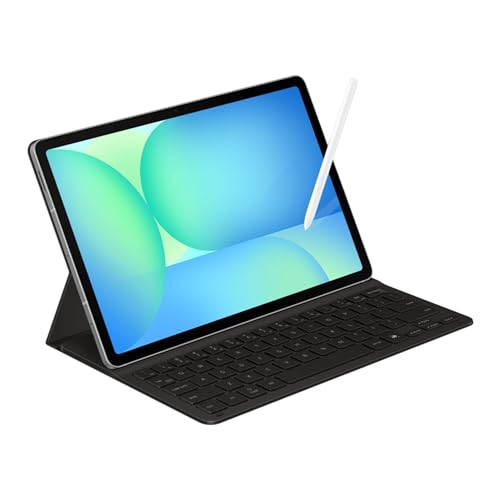
Android and Keyboard Bundle: Samsung Galaxy Tab S10 FE
10.9-inch screen, S Pen included, microSD slot and, in this listing, a keyboard cover for notes and papers.
Among our picks, the Tab S10 FE is the most complete out-of-the-box package for Android note-takers. Samsung lists a 10.9-inch LCD with an adaptive refresh rate up to 90Hz, an Exynos 1580 chip, IP68 water and dust resistance, microSD support and the S Pen in the box. The listing adds the Book Cover Keyboard Slim and a two-year manufacturer warranty, according to its title, so confirm those terms with the seller. The screen is an LCD rather than AMOLED, and the chip is mid-range, which is fine for notes, documents and video. See our Galaxy Tab S10 FE profile.
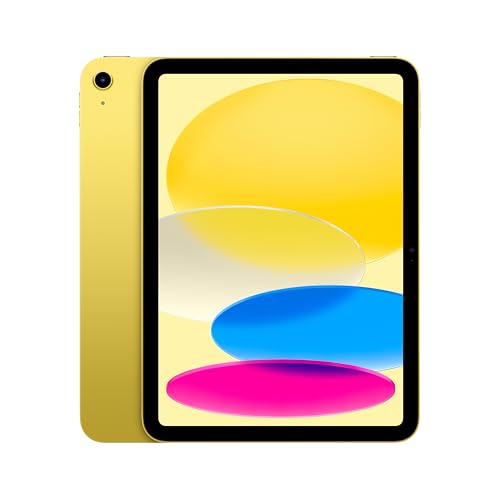
Budget-Friendly iPad: iPad 11-inch (A16)
An 11-inch Liquid Retina screen, A16 chip and USB-C Pencil support, for reading, notes and schoolwork.
If your budget is tight, the base iPad covers the basics. Apple lists an 11-inch Liquid Retina display at 2360 by 1640 pixels, an A16 chip, Touch ID, and support for Apple Pencil (USB-C) and the 1st-generation Pencil with an adapter. It does not support Pencil Pro. Apple does not list the memory, lamination or an antireflective coating on its spec page, and its USB-C port runs at USB 2.0 speeds. Choose it for reading, notes and homework. See the iPad 11-inch (A16) profile.
If you want something that fits in a jacket pocket, our iPad mini (A20 Pro) profile covers Apple’s compact option.
Which Should You Buy?
- Most students: the iPad Air 11-inch (M4).
- Android users who want pen and keyboard in one purchase: the Galaxy Tab S10 FE.
- Tighter budgets, mainly reading and basic notes: the iPad 11-inch (A16).
Whichever you pick, see how all the models compare in our best tablets of 2026 ranking, and spend a few minutes on your school’s technology page first. That check matters more than any spec on this list.
Sources
Frequently asked questions
Can a tablet replace a laptop in college?
For many students it can handle notes, PDFs, reading, email, video calls and writing, especially with a keyboard. It is riskier if your courses need Windows or macOS software or a proctored exam program. Check your school's requirements before you give up a laptop.
Which is better for college, an iPad or an Android tablet?
Both work. We pick the iPad Air 11-inch (M4) for most students. The Samsung Galaxy Tab S10 FE is the better fit if you prefer Android, want a microSD slot, or want a pen and keyboard in one listing, since this listing bundles the Book Cover Keyboard Slim.
Do I need an Apple Pencil for note-taking?
Only if you want to handwrite. Apple lists the iPad Air (M4) with Apple Pencil Pro and Apple Pencil (USB-C), and the iPad (A16) with the USB-C Pencil. Both Pencils are sold separately. Samsung includes the S Pen with the Galaxy Tab S10 FE.
Do tablets run Microsoft Word and Google Docs?
Microsoft says Word works on iOS and Android tablets, and that the mobile apps are free to download but some editing features need a Microsoft 365 plan. Google says the Docs app is in the App Store and Play Store and can edit Word files directly.
Is 128GB enough for college?
For notes, PDFs and cloud documents it is usually workable. The iPad Air (M4) and iPad (A16) cannot take a memory card, so offline video and large files fill them faster. The Galaxy Tab S10 FE has a microSD slot, sold separately, per Samsung.
Do Apple and Samsung offer student discounts?
Both run education programs. Apple says its education offers are for current and newly accepted college students, parents and educators, verified through UNiDAYS. Samsung says current students and faculty qualify through a .edu email, other providers or ID.me. Check each store for what applies today.